
AI test automation that doesn't just spit out Playwright scripts
TestResults is a visual AI test automation tool for banks. It identifies where issues would hurt most, creates test cases for those risks, and runs them across your tech stack through the screen, just like a user would. The AI runs on premises or in your private cloud, inside your network, and is never trained on your data.
QA can't afford hallucinations, bad fixes, or false positives. You need AI and QA to make a good team. And that definitely doesn't involve Playwright.

Every demo looks magical until you throw a genuinely complex application at it


Your current challenges

Probabilistic test runs
The agent does something different every time. So two runs never explore the same way.
False passes
A flaky test goes red for no reason, so you get annoyed and fix it. A false pass goes green for no reason, and you ship on it.
Tests that don't test anything
AI generates tests that don't test what actually matters or optimizes for getting a green checkmark.
With TestResults

Repeatable test runs
TestResults follows the same test steps every time, so you can reproduce failures and compare results across runs.
Reliable results
TestResults checks the actual outcome against the expected result. You only get a green checkmark when the application behaves as expected.
Tests that cover what matters
TestResults identifies where issues would hurt most and creates test cases that check those workflows through the screen.
What you get from AI in TestResults
1/ Identify what would hurt most
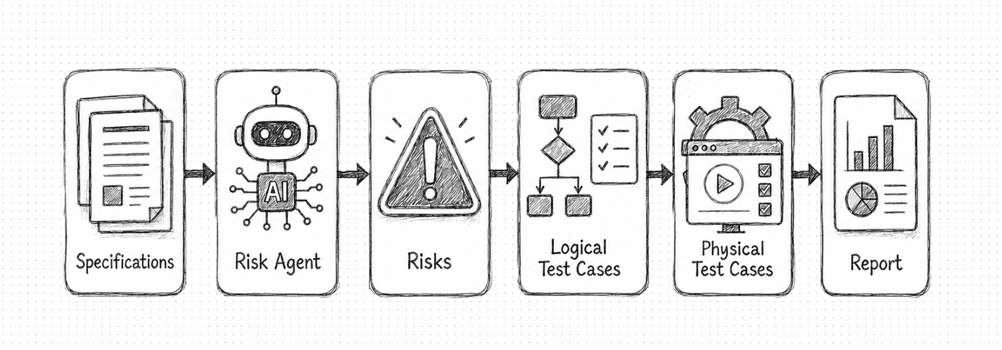
Using your software specification, use cases, user stories or whatever your team produces, TestResults identifies the applications' business risks and rates them where possible. And it asks you questions about everything that isn't specified or leaves too much room for interpretation. This gives you the foundation to discuss it with your team.
2/ Mitigate risks through test cases
To mitigate the identified risks, TestResults’ generative AI generates logical test cases and flags assumptions. Instead of hundreds of test cases, you get exactly the right ones. No duplicates, no gaps.
This gives you at least 80% business risk coverage.
3/ Know if it is really safe to ship
TestResults’ cognitive AI translates the test cases into interactions (physical test cases) and runs them across your entire tech stack. Taking the same defined paths every single time. If it's green, it's working for real. If it's red, there is an issue.
Your AI testing tool shouldn’t give QA more busy work
If your team still has to babysit test runs, fix tests after every UI change, and double check green results, how much work did the AI actually save?


Built for regulated industries
TestResults runs 100% locally, AI included, or with the AI model your bank has already approved. Your data stays inside the bank and is never used to train our models.

AI that stays inside your bank
Use your already approved AI model, so you skip a second security review, or let us help you get TestResults approved by your AI board.

Full visibility into every test
Every execution captures clear evidence, making audits, compliance reviews, and investigations faster.

Human approval remains part of the process
AI helps maintain test stability and coverage. Quality decisions remain with your team.
Every demo looks good on a login page
A real banking workflow might start in a browser and continue in a desktop app. You might need a login code to get in and a test account with the right data before you can make a payment.
TestResults Visual AI reads what’s on screen, finds the controls it needs, following the same steps a user would take across those applications.

FAQ: AI test automation for banks
Where the AI runs, what happens to your data and how it fits your security review.
On your infrastructure. TestResults is available on-premises or in your private cloud, and the AI features run there too.
Yes. If your bank has already approved an AI model, TestResults can work with it, so you don’t need a second security review for a new model.
No. Every license includes the AI features, with unlimited test cases and executions. Request pricing.
If you run the AI on-premises, screenshots, test data and results are stored and processed inside your environment.
Self-healing repairs a broken locator by guessing which element was meant. TestResults finds elements visually, so there is no locator to repair and no guess that could turn a real bug into a passing test. More in our guide on self-healing tests.
Yes. TestResults recognizes what is on screen, so it works the same way on web, desktop and legacy applications and inside Citrix and VDI.
